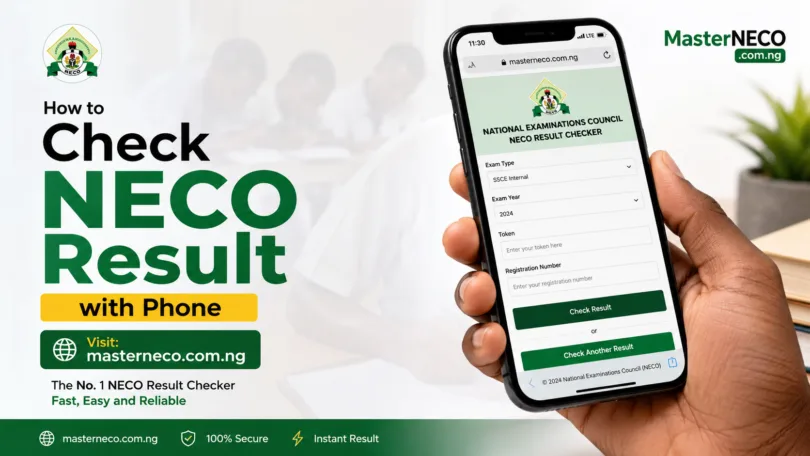
How to Check NECO Result with Phone in 2026. Yearly, millions of Nigerian students search for the easiest way to check their NECO results online. The good news is that the process is now faster, simpler, and fully mobile-friendly.
Whether you used an Android phone, iPhone, tablet, or laptop, you can access your NECO result within minutes once it is officially released.
In this detailed guide, you will learn exactly how to check NECO Result with phone in 2026 without confusion. You will also discover how to buy a NECO token, solve common portal errors, print your result, and avoid fake websites that steal candidate details.
If you recently sat for NECO SSCE Internal, SSCE External, BECE, or NCEE, this article contains everything you need.
Recent educational updates confirm that NECO results can be checked through the official NECO result portal using a valid token or scratch card.
What Is NECO?
National Examinations Council, popularly known as NECO, is one of Nigeria’s major examination bodies. It conducts examinations such as:
- SSCE Internal (School Candidates)
- SSCE External (Private Candidates)
- BECE
- NCEE
After the exams are marked and approved, candidates can check their results online using the official result checker portal.
Today, many students prefer using smartphones because it is convenient, fast, and accessible from anywhere. That is why knowing How to Check NECO Result with Phone has become very important for candidates and parents alike.
General Requirements for Checking NECO Result in 2026
Before learning How to Check NECO Result with Phone, make sure you have the following ready:
| Requirement | Description |
|---|---|
| Smartphone | Android or iPhone with internet access |
| Browser | Chrome, Safari, Opera Mini, Firefox, etc. |
| NECO Exam Number | Your correct registration number |
| Examination Year | 2026 |
| Examination Type | SSCE Internal, External, BECE, etc. |
| NECO Token or Scratch Card | Required to access full result |
| Internet Connection | Stable mobile data or Wi-Fi |
Educational portals and NECO-related guides confirm that candidates need a valid token or scratch card together with their exam number before checking results online.
Step-by-Step Guide on How to Check NECO Result with Phone in 2026
This section explains the exact process for How to Check NECO Result with Phone in 2026.
Step 1: Open Your Browser
Using your phone, launch any browser such as:
- Google Chrome
- Opera Mini
- Safari
- Firefox
A stable browser helps the NECO portal load properly.
Step 2: Visit the Official NECO Result Portal
Open the official NECO result checker website: NECO Result Checker Portal
Always ensure you are using the official NECO portal to avoid scams and fake result websites.
Multiple educational guides warn students against fake portals pretending to offer free NECO result checking services.
Step 3: Select Examination Year
Choose: 2026.
This ensures the system searches for the correct examination session.
Step 4: Select Examination Type
Choose the exact exam you wrote:
| Exam Type | Meaning |
|---|---|
| SSCE Internal | School candidates |
| SSCE External | Private candidates |
| BECE | Junior WAEC |
| NCEE | National Common Entrance |
Selecting the wrong examination type can cause result errors.
Step 5: Enter Your Token or Scratch Card PIN
Input your:
- Token PIN
- Serial Number
These details are usually sent to you after purchasing a NECO token. Most guides now explain that NECO uses digital tokens instead of the old scratch card system in many cases.
Step 6: Enter Your Examination Number
Type your NECO registration number correctly.
Example:
12345678AB
Double-check every digit before proceeding.
Step 7: Click “Check Result”
Tap the “Check Result” button. Your NECO result should appear on your screen within seconds.
This is the complete process for checking your NECO Result with Phone in 2026.
How to Buy NECO Token in 2026
Before checking your result, you may need to buy a NECO token.
Where to Buy NECO Token
You can buy it from:
| Platform | Availability |
|---|---|
| Official NECO Website | Online |
| Banks | Nationwide |
| Cyber Cafés | Local vendors |
| Educational Platforms | Approved resellers |
Some educational sources report that NECO tokens are valid for limited result checks only.
Steps to Buy NECO Token Online
Option 1: Through NECO Portal
Visit the Official NECO Website
Then:
- Create an account
- Login
- Purchase token
- Make payment
- Receive token PIN
Payment Methods Available
You can pay using:
- ATM card
- Bank transfer
- USSD
- Remita
- Internet banking
Can I Check NECO Result Without Scratch Card?
One of the most searched questions online is whether students can check results without a token. The answer is generally no.
Most official guides explain that candidates need a valid token or scratch card to access detailed results online. However, some schools may help students confirm grades temporarily before they purchase tokens.
Still, the official method for How to Check NECO Result with Phone in 2026 requires a valid token.
How to Check NECO Result via SMS in 2026
Some candidates prefer SMS because of slow internet connections.
Although portal checking is the most common method, some educational platforms mention SMS alternatives depending on NECO availability.
A. SMS Format
Send:
NECO ExamNo PIN ExamYear
to the approved shortcode provided by NECO.
Example:
NECO 12345678AB 123456789012 2026
Note that SMS services may not always be available every year.
Common Errors When Checking NECO Result
While learning How to Check NECO Result with Phone in 2026, you may encounter some errors.
Below are the common ones and their solutions.
| Error Message | Meaning | Solution |
|---|---|---|
| Result Not Found | Wrong exam number | Recheck details |
| Invalid Token | Wrong PIN | Use correct token |
| Portal Busy | Heavy traffic | Retry later |
| Network Error | Poor internet | Change connection |
| Session Expired | Portal timeout | Refresh page |
How to Print NECO Result from Your Phone
After checking your result, it is advisable to save or print it.
Method 1: Save as PDF
- Click Print
- Choose “Save as PDF”
- Save to your phone
Method 2: Print Through Cyber Café
You can also:
- Screenshot the result
- Send it to a cyber café
- Print hard copy
Several online guides recommend saving results immediately because the portal may refresh unexpectedly.
Is the Online NECO Result Printout Official?
The online printout is useful for:
- Admission processing
- Personal reference
- Scholarship applications
However, some institutions may later request the official NECO certificate.
How Many Times Can One Token Be Used?
Most NECO tokens have limited usage. Several sources indicate that a token can be used multiple times for one candidate before expiration.
Always keep your token safe after checking your result.
Security Tips When Checking NECO Result Online
Understanding How to Check NECO Result with Phone in 2026 also means protecting your personal information.
Important Safety Tips
| Tip | Reason |
|---|---|
| Use official portal only | Avoid fraud |
| Do not share token publicly | Prevent unauthorized access |
| Avoid fake Telegram links | Many are scams |
| Use trusted cyber cafés | Protect data |
| Save your result immediately | Portal may timeout |
Advantages of Checking NECO Result with Phone
There are many reasons why students now prefer mobile phones.
A. Benefits
1. Faster Access
You can check results instantly.
2. Convenience
No need for a computer.
3. Lower Cost
You avoid cyber café charges.
4. Available Anywhere
You can check from home, school, or office.
These benefits explain why many candidates now search for How to Check NECO Result with Phone instead of visiting cafés.
Difference Between NECO Scratch Card and Token
Many students are confused about this. Here is the difference.
| Scratch Card | Token |
|---|---|
| Older method | Modern digital method |
| Physical card | Digital PIN |
| Scratched manually | Generated electronically |
| Less flexible | Easier online purchase |
Modern NECO systems now rely more on digital tokens than traditional scratch cards.
What to Do If Your NECO Result Is Withheld
Sometimes NECO may withhold results because of examination malpractice investigations. If this happens:
- Contact your school
- Visit NECO office
- Wait for official update
- Avoid fake “result upgrade” scams
Never pay anyone promising to alter your NECO grades illegally.
Can I Use Someone Else’s Phone to Check My Result?
Yes. The important thing is having:
- Correct exam number
- Valid token
- Internet connection
The device itself does not matter.
Best Time to Check NECO Result Online
When NECO releases results officially, portal traffic becomes very high.
To avoid delays:
| Best Time | Reason |
|---|---|
| Early morning | Less traffic |
| Late night | Faster loading |
| Midday weekdays | Moderate activity |
Why NECO Portal Sometimes Fails
Heavy nationwide traffic is usually responsible. Millions of students try to access the portal immediately after result release.
When this happens:
- Refresh page
- Retry later
- Use another browser
- Switch network provider
Mistakes to Avoid When Checking NECO Result
If you truly want success with How to Check NECO Result with Phone in 2026, avoid these common mistakes.
Common Mistakes
- Using wrong exam year
- Typing incorrect registration number
- Visiting fake websites
- Sharing token publicly
- Using expired token
- Panicking during portal delays
Frequently Asked Questions
Is NECO Result for 2026 Out?
NECO usually announces officially when results are released. Candidates should monitor official NECO updates and trusted educational platforms.
Can I Check NECO Result for Free?
Generally, no. You need a valid token or scratch card.
Can I Check NECO Result Without Internet?
Only SMS methods may work without internet if activated officially.
Can I Use One Token for Two Different Candidates?
No. Most tokens are linked to a single candidate only.
What Website Can I Use?
Use only: Official NECO Result Portal
Conclusion
Understanding How to Check NECO Result with Phone in 2026 is now easier than ever. With just your smartphone, internet connection, examination number, and valid token, you can access your NECO result within minutes from anywhere in Nigeria.
The most important thing is to use the official NECO portal, avoid scammers, and enter your details carefully. As more students continue relying on mobile devices, learning How to Check NECO Result with Phone has become an essential digital skill for every NECO candidate.
Whether you wrote SSCE Internal, External, BECE, or NCEE, the process remains simple once you follow the correct steps.
Always remember to keep your token safe, save your result immediately, avoid fake result websites and double-check your exam details
If you follow this guide correctly, checking your NECO result in 2026 should be smooth and stress-free.




Leave a Comment